22.01.12

Audio Spectrum Analyzer Step #2

      This is a follow-up post on building audio spectrum analyzer. 
    In previous post I created circuit that could show audio spectrum on one 10 segment led bargraph display. Also in previous post I encountered problem with signal strength, so I have to implement solution on adjusting audio signal level.
    But before creating amplifier, I decided that I should stack up another led bargraph, so i would have 20 led segments in a row.
     This way I will have bigger range to test audio amplifier performance.
     The fundamentals of getting it done is wiring two LM3914 IC so that they would work "hand-in-hand". I.e. when signal is 0, both LED bargraphs should be blank (not lit), when signal is to the max, both LED bargraphs should be lit fully.
     While searching through the Internet, I saw different versions of combining these IC, but believe it or not, the best diagram can be found in official LM3914 datasheet. :)
      I recreated the diagram so it would be a bit more understandable taking out mode switch and rearranging LM3914 IC placement in original scheme. 
This is what I got:
   
Using this scheme, I created circuit on a breadboard:  


Don't pay attention to the resistor across the led bargraph. I rearranged it afterwards.

And this is the video of what I got:
      As you can see, signal from computer is only strong enough to light only one LED bar graph. So next step will be signal amplifier implementation. 
      At this point I was wondering, is the second bar graph actually working or is there a problem in my circuit. But when I disconnect audio jack, both led bargraphs light up. This is a good sign as I can see, that both ledbars are working. But, I will have to find out, why is it lighting up when I disconnect signal and how to prevent it. 


Problems: 
1. Implement pot to adjust LED brightness.
2. Implement audio signal amplifier.
3. Find out why both led bargraphs are lit when audio jack connector is disconnected and how to prevent it.
4. I should order few LM3916 ICs and try them instead of LM3914 as they are more suitable for audio signal metering.

13.01.12

Audio Spectrum Analyzer Step #1

     Some time ago I decided that I want audio spectrum analyzer in my car. Not for any practical reasons. Just BECAUSE I CAN. :D Well, the idea started as a rotating center console with iPhone attached to it, which should display live audio spectrum using microphone as an input signal.
     I got far with that project, as you can see in this blog (read "Motorized gadget"), but unfortunately I encountered some major problems.
     1. iPhone was a bit too big for the space in which it should rotate. When the console is being inserted in car, it has less space than it is while console is on my table. So iPhone gets stuck.
     2. Microphone is a bad way to "capture" input signal. Every microphone and every speaker has its audio range which it can sense and play. So microphone couldn't display/analyze audio spectrum precisely. And I didn't want to mess with iPhone's electronics and OS/apps.

     Although previous project is unfinished (and it seems that it will stay that way) I still wanted to integrate audio spectrum analyzer in my car.
     You can buy already pre-assambled kits, but hey - building it on my own sounds more exciting and interesting.

So here it goes.
     Since I'm an IT specialist with some background in programming I'm used to develop programs building one small module, then test it. Then build next module and integrate it with previous. And again - test it. So this project will be held similar.

     I started by creating one LED bar graph which would work as an audio spectrum analyzer.
     Started by reading some tutorials, gathering information and buying electronic stuff.

     The most fundamental part of this schematics is dot/bar display driver integrated circuit (IC) LM3914.
     There are three IC types in the LM39 group. Although LM3916 would be more suitable for this project, as it is working better with audio signals, I bought LM3914.

Schematics are pretty much the same for all LM39 IC, so I used the following schematics:
Scheme taken from: CircuitsOnline.net

The parts needed for this are:
IC = LM3914 or LM3915 or LM3916
R1 = 1k Ohm
LED = led bar graph (I used Kingbright. You can use seperate LEDs, but then resistor for each LED must be applied)
C1 = 2.2uF 50V (electrolytic)

In this scheme on the pin5 audio signal must be applied.
My input voltage ~9 V.

This is how it looks on breadboard:

This is the video:


PROBLEM:
     1. Input signal from computer is ok. Input signal taken from phone is too weak. Signal amplification is needed and also possibility to adjust signal gain with potentiometer.

NEXT STEPS:
     1. Signal amplification with Low Voltage Audio Power Amplifier IC (LM386) and potentiometer for signal gain adjustment.


26.03.11

Covering tweeter pods with cloth

    In 2010 I started to create tweeter pods for my car. I really liked that black cloth called Alcantara which usually comes in Lamborghini or Audi RS series. So I thought - why couldn't I use it for my little project. When I saw the actual price for genuine Alcantara cloth I started to look for alternatives. Alcantara cloth costs about 160 $ per meter. :) Luckily I found alternative - cloth that is something similar to suede, so it looks almost as Alcantara. And it costs only 20$ per meter.

   I won't describe the steps needed to create customized tweeter pods from fiberglass since I already described it in my previous posts:
Tweeter pods: Step #1
Tweeter pods: Step #2
Tweeter pods: Step #3

   So in this post I'll write only about covering tweeter pods with cloth.

   The actual steps for applying this cloth is almost the same as in the given links above. The only thing that is different - I tried my luck in sewing.

   If you read my previous post you would already know that I'll be using two peaces of cloth which will be joined by sewing them right next to the tweeter. This is necessary because by applying only one peace there would be a lot of wrinkles.

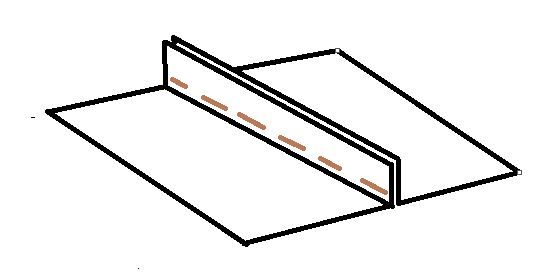
   Since I didn't have sewing machine I tried my luck sewing by hand. I'll try to illustrate:

   In the picture above you can see how the sewing was done. The part that is in the picture vertically will be as the lower side so it won't be seen. The stitches won't be seen as well.

   It's important to put both cloth on the fiberglass trim (tweeter pod) and see that everything is ok. Than sew it together and only then glue it to the fiberglass trim. 
   Unfortunately I don't have pictures from the actual process. 
   I can only suggest to be very careful because it is very hard to sew and cut both peaces of cloth precisely. There will be wrinkles at first attempt. As you will see in the following pictures, I had wrinkles on the cloth also. Some day I'll reapply the fabric to get rid of the failures. 


   This time these tweeter pods didn't fit perfectly so I had to glue the original clips to the fiberglass trim.
Now the hardest thing was to understand - where to glue these clips. 
Clips look like this:


   In the following picture you can see the actual car front pillar and holes which are meant for the clips. 


   The next picture shows the back side of fiberglass pillar trim. 


    So how to find - where to glue the clips on the fiberglass trim?
   I used plasticine (molding clay). I put a lump of it on the back side of the trim approximately against the holes in the pillar.
   Then pressed the trim to the pillar in the position as it should be staying. Then took the trim of the pillar. In the best case, plasticine lump should stay on the fiberglass trim with a shape of the hole for clip. 

   I have illustrated it in the picture:


   The blue stuff in the picture is plasticine and the gray rectangle is shape that formed after pressing trim to the pillar. The black lines are drawn with marker so that when I remove the plasticine, I can see the place, where clip should be.

So that's it. 


24.03.11

Midrange speaker pods: step #2

   The doors at this point are packed with vibroisolation, so it's time to start creating pods.
Creating structure for pods is a creative thing. There are a lot of different solutions and types of construction. You just have to use imagination. It is only important that these pods would be stable, they wouldn't wobble around and they would be joined with the doors, so - construction should be rigid.
I used small wooden bricks as you will see in the pictures below.
    The first problem I encountered is that the door panel/trim is thick so speaker ring (wooden ring on which speaker will be attached) must be quite far from the door structure. Since I didn't had very long screws that would go from wooden speaker ring to the door structure I had to improvise. 
I'll try to sketch what I have done:


    This, of course, is not the best way to create distance between doors and speaker ring, but it did the trick for me. This construction was stable and rigid.
    To create the above construction first of all you have to cut a hole in the door panel where the pod will be. I cut the panel with jigsaw. The hole in panel is needed to measure what will be the distance between door structure and speaker ring. As you can see in the picture below, I have cut hole in the door panel and attached few wooden bricks (not enough).


    After attaching few extra wooden bricks until appropriate distance has been achieved, speaker ring has to be attached.
    The speaker ring should be placed in such angle that speaker would point to the gearbox leaver.


    Next step is to cover this construction with vibroisolation so it would be hermetical (keep in mind that it is impossible to make it airtight - just do your best).


    Then attach the speaker (don't forget to connect the wires... :) ).
   It would be best to apply some silicone between wooden ring and speaker (if the speaker doesn't have rubber ring).


In addition I would suggest to put some cloth between doors and door panel. Because panel is made from plastics and the aluminum foil is not very elastic. Since this speaker will produce a lot of vibration, layer of cloth between door and its panel will reduce additional unwanted noises. 

   At this point I haven't created decorative trim for the pods. I'll try to work on them this summer using fiberglass. This will be very difficult task, but interesting and useful.

Midrange speaker pods: step #1

    When I started to upgrade my car audio system, one of the most important part was speakers. Every normal sound system has at least two-component frontal speaker system. By default, midrange speakers are placed in doors (near legs) and tweeters (high frequency speakers) are placed on the front panel or in the upper part of the doors. As you might seen, I have already posted 3 steps on how to create tweeter pods in front pillar trims so that tweeters would be higher than built-in factory tweeters. This time I'll describe how I created midrange speaker pods in my front doors. 
   Audi I own, has original 13cm speakers in doors which were not enough for my system. The most popular speaker size for audio fans is 16.5 cm. These speakers are bigger and able to produce more bass frequency, are louder and more powerful.  
   So the goal is - 16.5cm speakers. As I said that original space allows to setup only 13 cm speakers, so it is necessary to make modifications in the door trim/panel. Before you do this you must understand that this will ruin your original looks of the car interior. But you have to make sacrifices in the name of high quality music in your car.
   The first step is to disassemble the door trim/panel and soundproof the inside of the door. It is very important, because bigger and more powerful speakers produce bigger vibrations. Doors are made of quite thin metal so they tend to resonate creating unnecessary additional sounds. Also from vibrations door metal moves forwards and backwards, so the volume of doors are changing (not much, but still) and it distorts the sound.
I used vibroisolation material that can be bought in specialized car audio stores. Vibroisolation roughly consists of bitumen layer and thin aluminum foil layer. This vibroisolation is quite heavy as its purpose is to make door metal heavier = harder to move.
In the following picture you can see how I isolated my front door from inside:


   This particular isolation material is easy to apply, you just have to peal of the paper which protects the adhesive side and stick it to the metal.

   As you see in the picture above, I have attached plywood form that will support the construction of the speaker pod. This is necessary to have a surface to which I can attach pod construction. 
Preferably metal would be used instead of plywood, because the inside of the doors gets moist in bad weather so wood can rot in these conditions. However, I have these pods installed for about 2 years know and everything is OK. If you use wood, it would be best to apply a coat of protective paint.

   I think everyone knows that speakers can work only in boxes. Well, they CAN work without boxes, but they sound really crappy without boxes. As for midrange speakers, they are made for approximate volumes that usually car doors have. As you should know, the best box for speakers is hermetical. Unfortunately we can't make doors hermetic but we can do our best. So I applied vibroisolation for the outer side of doors (much more sense will occur after looking at the picture below). Don't forget to cut small holes for the wires!


Next posts will follow!

How to get a broken tip of 3.5mm jack connector from female plug?

     A while ago I had very unfortunate problem. I found out that the tip of my headphone connector (jack 3.5mm) had broken and stayed within laptop "female" connector.
Since there is a small pin that fixates jack within female connector, I couldn't get it out just by shaking my laptop.
You can see rough sketch of the broken connector pin:
   So how to get it out? I first disassembled my laptop trying to get to the connector from within. Unfortunately that connector was fully enclosed so I was not able to get to the broken pin. 
Since usage of headphones/external speakers is crucial for me, I started to think of other ways to do this. 

   Than I had an idea which actually worked.
What to do?

   You have to take about 6 cm of a wire, take of the isolation and solder its tip so it would be covered in tin.


       After this take your pliers and soldering iron. In one hand take your pliers and grab a hold (with the pliers) of the wire. Than put it in the "female" connector so that it would touch the broken tip of the jack connector. Then take your soldering iron in other hand and put it against wire between "female" connector and pliers. Wait for a while. Holding your soldering iron against wire will eventually heat up the wire to the temperature when tin will melt. As it melts, it will solder the wire together with the broken tip of jack connector.


    After a while try to take off the soldering iron and wait for few seconds. Tin will harden and you will be able to pull out the broken tip with your wire.


23.03.11

Tweeter pods: Step #3

If you follow this project you should already read these posts:
   Tweeter pods: Step #1
   Tweeter pods: Step #2

    In recent blog posts I described how to make fiberglass front pillar trim with tweeter pods.
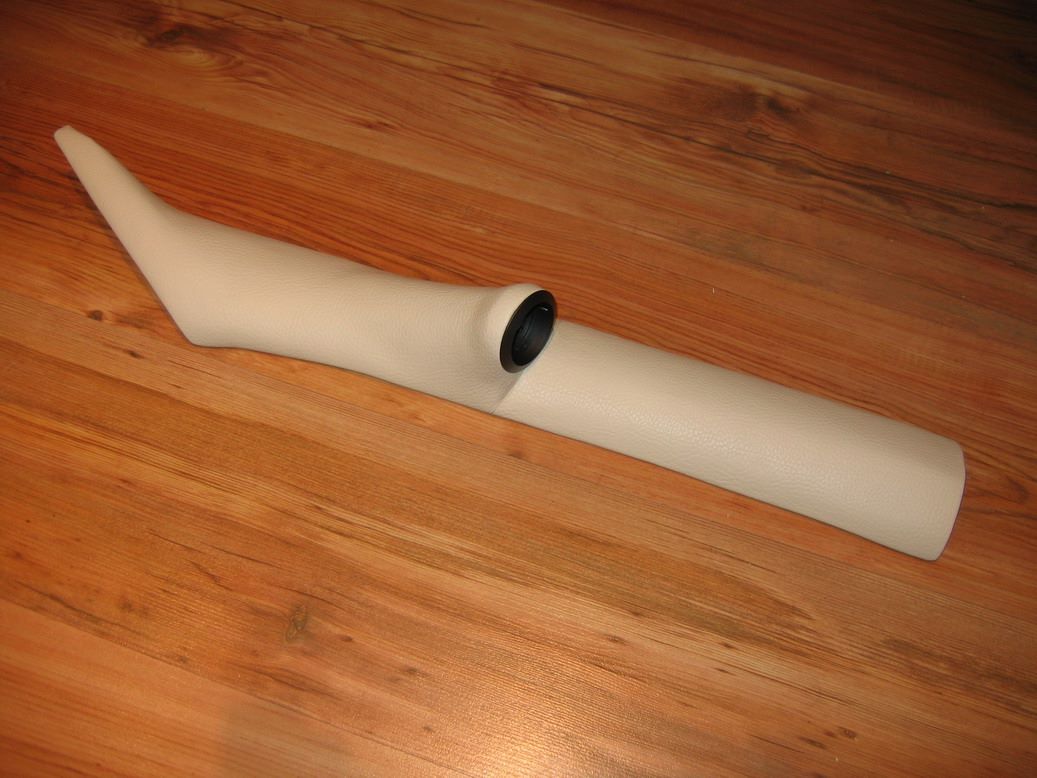
    At this point the trim is ready to cover it with leather or cloth. In this project I used artificial leather in cream color (since the interior for the car I'm building this project is white/cream color. In next posts I'll show pictures of pillar trim for my car which I covered with black alcantara-like cloth. 

   Since this project has the tweeters in almost 90 degree angle to the trim, there were problems applying the leather. You see, the more irregular shape is the trim the harder it is to put on cloth without wrinkling. 

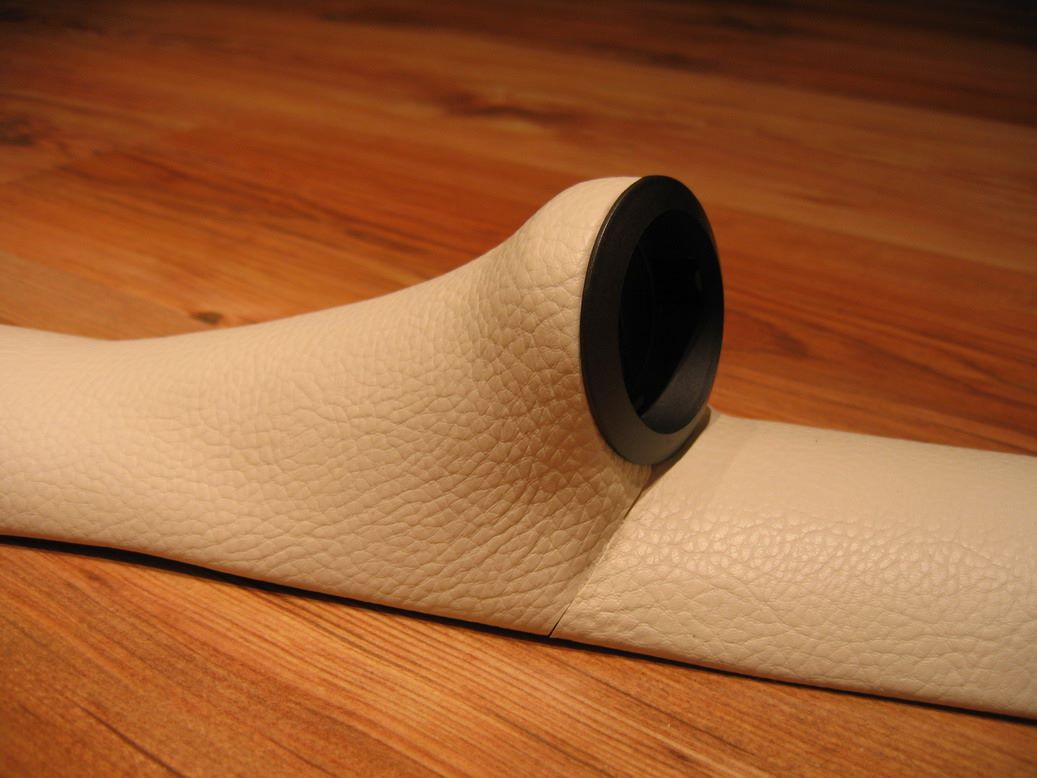
  The shape of this trim is extra difficult so I had to apply two parts of leather. Two leather pieces should be put together at the corner of tweeter and trim (you'll understand it in the next pictures). The best way to join both pieces of leather is by sewing. Unfortunately it requires great skill and sewing machine. And a lot of testing, experimenting and failing. :)
   In this project I tried to join them as close as possible to get rid of the gap between both pieces of leather. 
I failed, but got great experience on how to do that in my next projects. Soon I will reapply leather pieces with sewing stitches for these pillar trims. Something similar to the picture:

   OK, so to attach leather to the trim I used glue. I can't find the name of the glue, but it looks like honey, it can dry fast and can glue leather, wood, plastics, metal, glass etc.

   So I cut out approximate shape of the leather cloth so it would overlap the edges of the trim (so I would be able to bend it around the trim edges afterwards. 
   Apply glue to the trim surface and to the leather. Then allow it to soak for 3-5 minutes and put the leather on the trim surface. It will glue almost instantly, so be precise and careful. Also try to get rid of the air bubbles underneath the leather. Don't apply the glue to all the leather and trim, try to take several steps to not mess it up at once. 
    The difficult part starts at the tweeter post angles. I can't really explain how did I do it. I used razor blade to cut the leather. You can see in pictures beneath that there are lot of flaws, but it was the best I can do at that moment. 


   After this drill hole in the trim, so tweeter wire would fit. 

   The next difficult thing is - how to attach clips so that trim would clip on to the pillar. 
   At this project I didn't attach clips because this fiberglass trim fitted perfectly in the car and didn't make any gaps between trim and pillar. 

   In my other project I glued the clips on the back to the fiberglass trim so it could be attached to the pillar. But more on that in my future posts. 

   So the result in car looks like this: